Accessing Carousel Rendering Logs
Last Updated:January 13, 2024
Applies to
Carousel 7.0.0+
Introduction
Carousel 7.0.0 and above log bulletin rendering operations for diagnostic purposes. This feature was conceived to assist Tightrope's technical support team in diagnosing rendering issues.
Accessing Logs
Locate the bulletin for which you would like to review logs.
Click Preview to open the bulletin preview screen
Scroll down in the details list until you see Last Rendered
Click on the Last Rendered date to open the log viewer.
Log Details
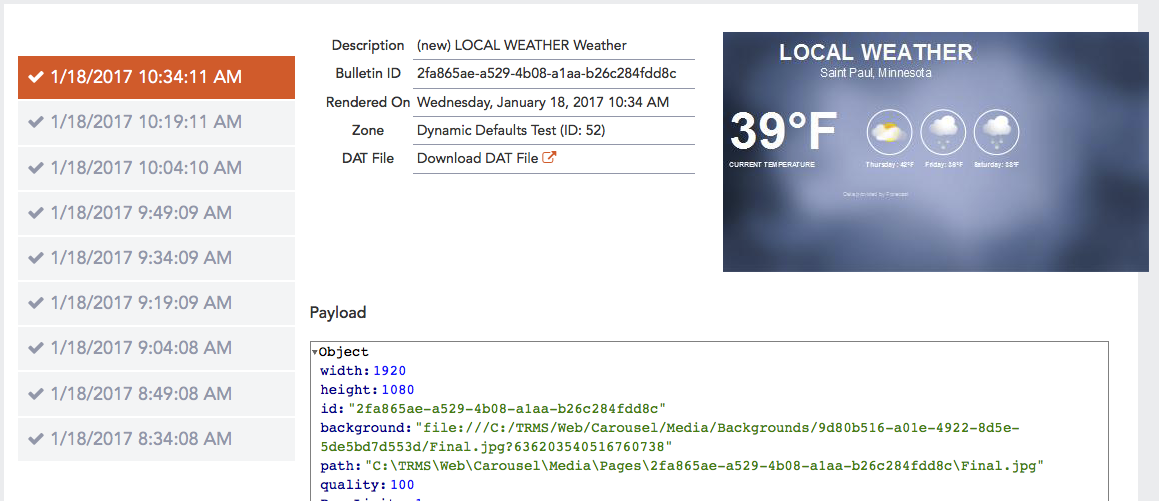
The left side of the screen shows the most recent times that this bulletin was rendered. You can click on each occurrence to view details of that rendering.
The right side of the screen shows the details for the selected rendering.