Sponsoring Content
Producer sponsorship lets you cover the download cost of your own show, so stations can download it for free. It's a simple way to get your show on as many channels as possible.
Before you start
You'll need an approved PEGMedia producer account.
You'll need a show. If you don't have one yet, see Creating a Show in PEGMedia.
Sponsorship options
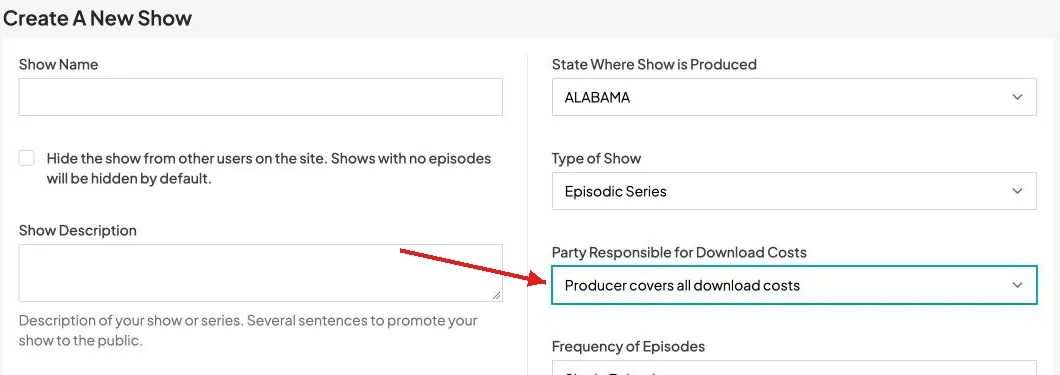
Sponsorship is set with the Party Responsible for Download Costs field on your show. Choose one of three options:
Users cover download cost — stations pay for their own downloads. Community members still download for free.
Producer covers all download costs — you pay for every download, so your show is free for everyone.
Producer covers costs for users in their state — you pay for downloads by users in your state. Users in other states pay for their own downloads.
1. Open your show's settings
Go to My Shows and open the show you want to sponsor. You can also set sponsorship when you first create a show.
2. Choose who pays for downloads
In the Party Responsible for Download Costs field, select the option that fits your show.
3. Save your changes
Click Save Changes. The new setting applies to downloads of your show from then on.
How sponsorship affects stations
Sponsoring your show makes it free for stations to download, which helps get it on as many channels as possible.
When stations browse shows, sponsored shows are labeled Sponsored.
The download button on sponsored episodes reads Get it free, so stations can add them to their download queue without paying.
Your show page lists your choice under Sponsorship Level.

Note: Community members can already download all content for free. Sponsorship matters most for reaching stations outside your communities.
Best practices for producers
Choose the option that matches your funding. For example, if your funding only covers stations in your state, choose Producer covers costs for users in their state.
Keep the setting accurate so stations know what to expect when they download your show.
If your sponsorship changes between seasons or episodes, update the setting on your show.
What's next
Getting help
Questions about sponsoring your show? Email us at support@pegmedia.org — you can also find our email address in the footer of any page on the site.
